Embed a published diagram
Show a published diagram in a Markdown file or a web page, and have it update when you publish a new version.
Only Public diagrams can be embedded
An embed works on any page that can show an image from a web address. It shows on other sites only when the diagram’s visibility is Public. A Team or Private diagram shows as a broken image there, even to people who can see it on Line9. See Who can see it.
Get the embed address
- Open the diagram’s own page: click Open after publishing, or click its name in your published diagrams.
- Click Share in the top-right corner. Under Embed, click Copy URL, Copy Markdown or Copy HTML.
The embed address is the page’s address with .svg on the end. It always shows the latest published version.
Line9 also shows the embed address when you first publish, under Living embed:
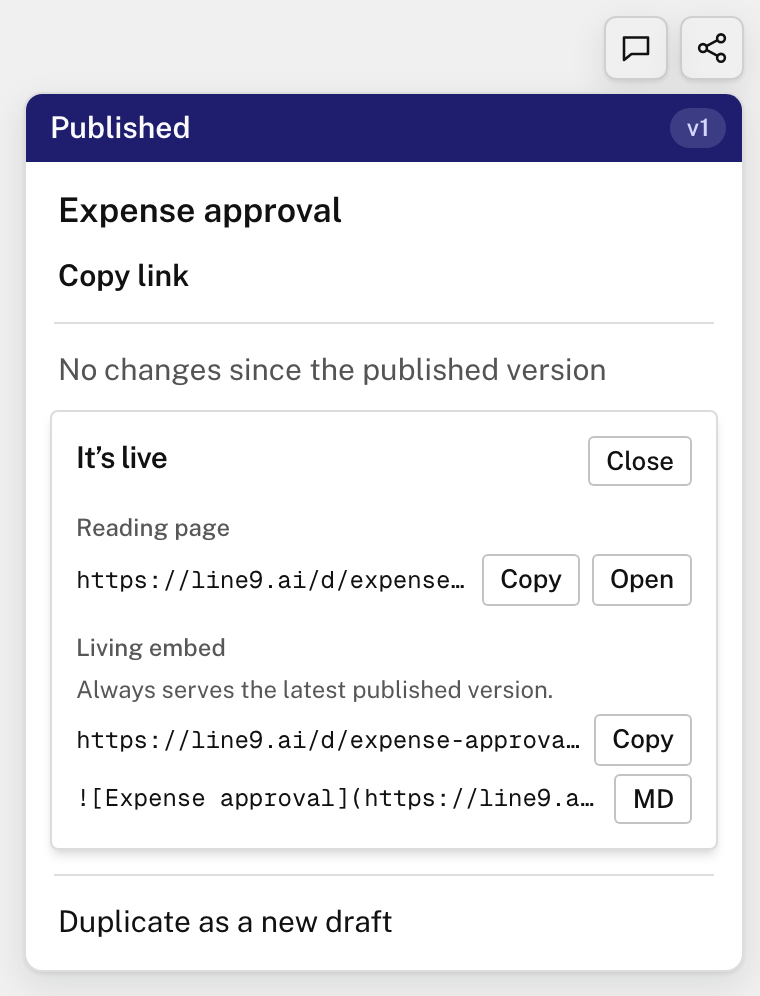
In Markdown
Paste the Markdown into a README, a wiki page or any other Markdown file:
In HTML
Paste this into a web page:
<img src="https://line9.ai/d/expense-approval-k3x9p2qa.svg" alt="Expense approval" />When an embed updates
When you publish a new version, an embed can take up to a day to show it everywhere.
Next
- Update and manage published diagrams: publish a new version.
- Publish a diagram: choose who can see it.