A new rendering engine for Mermaid

Keep Mermaid but fix the layout.

Your AI agent writes great Mermaid. Default viewers render it badly. Line9 is a new engine for the same syntax — superior layout, presentation-ready type, no markup changes.

State Machine rendered by Mermaid
Mermaid · the default
State Machine rendered by Line9
Line9 · the same source
Free CLI · no signup · macOS · Linux · Windows

Render Mermaid straight from your terminal, and give your AI agent a render tool it can call.

curl -fsSL https://line9.ai/install.sh | sh
All install options →

Before & after

Authorization Flow rendered by Mermaid
Mermaid · the default
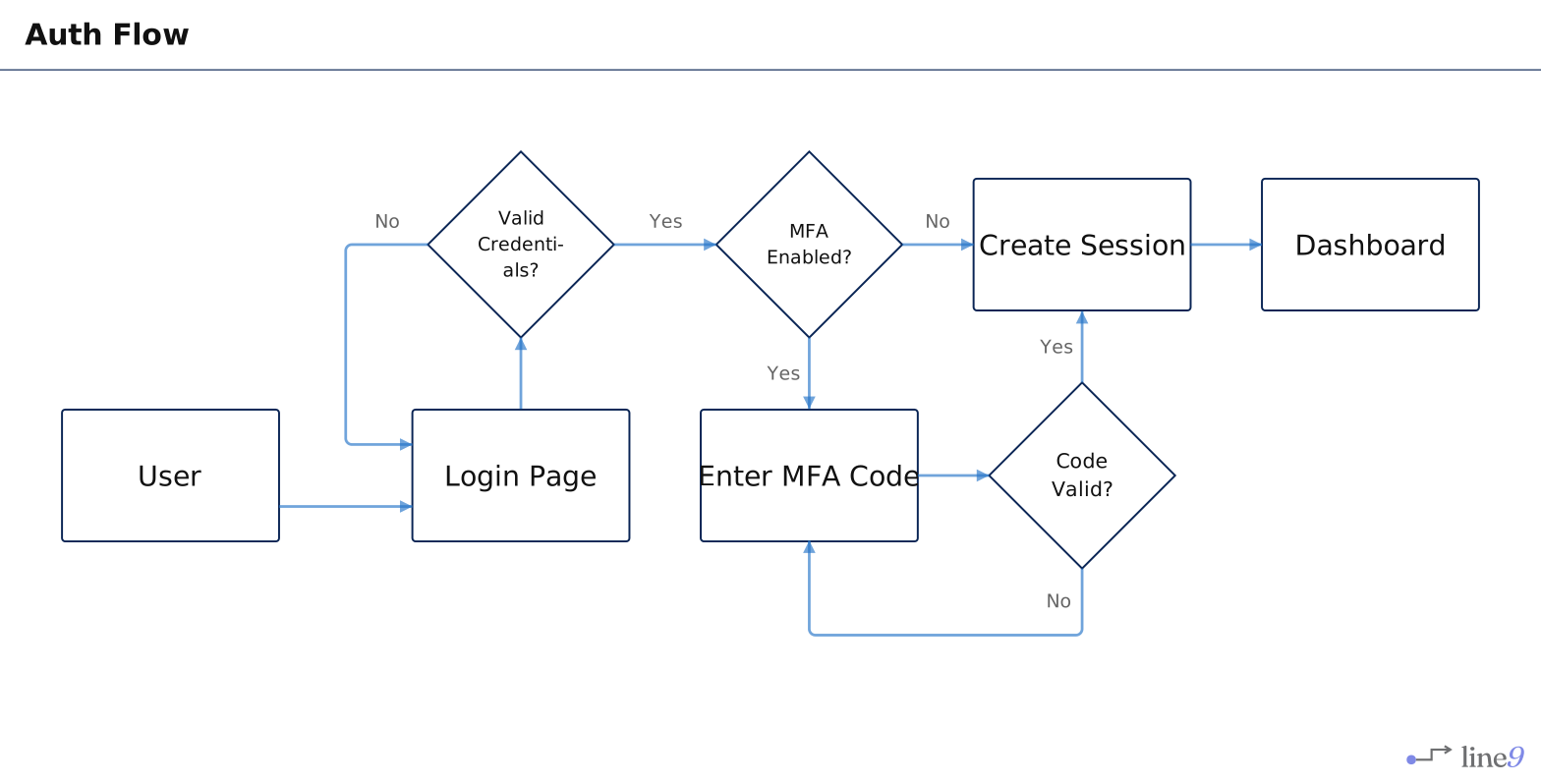
Authorization Flow rendered by Line9
Line9 · the same source
Open this example in the viewer →

Compact, not sprawling

Mermaid stretches the auth flow into one long, thin ribbon you have to scan end to end. line9 folds the same source into a tight block your eye takes in at once — same diagram, a fraction of the space.

Why Line9

Usable layout, automatically.

Carefully placed nodes, shorter arrows, fewer line crossings. Diagrams you can read and share — without twenty minutes of clicking and dragging.

Legible on a screen or page.

Aspect ratio is a goal. Flowcharts that: 1) fit on a page and 2) stay large enough to read. Get both, simultaneously.

Type, not decoration.

Themes designed as typography, not palettes. Export to SVG and PNG with the same care a typesetter would bring.

How it works

You (or your agent) write Mermaid.

The same .mmd you already write. Nothing new to learn, nothing to migrate — Line9 reads the format AI tools already speak.

We parse it with Mermaid's own parser.

Line9 uses Mermaid to understand your source, then discards its rendering pipeline entirely. Identical input, completely different engine.

Our engine lays it out from scratch.

Placement, orthogonal routing, semantic styling and type — composed for legibility, not for a 2012 layout algorithm. Paste and render in five seconds, no login.

How to use Line9

View a diagram you already have

Have some Mermaid diagrams already? See them with Line9’s readable and stylish rendering by pasting your text directly into the diagram editor page. In many cases you’ll get a more usable diagram than you started with. Alternatively, if your diagrams are on disk, use the Line9 CLI with this command line9 render <diagram.mmd>.

From the diagram web page you can export SVG or PNG format images or copy the shareable URL to send your diagrams to others. Even better, with Line9 Pro, publish your diagram to your account’s workspace and get clean, durable shareable URLs and embeddable snippets for Markdown and HTML.

Create a new diagram by hand

Open the diagram editor page and write Mermaid source text into the text panel: your diagram will appear as you go. Working this way has long been the standard process for Mermaid flowchart creation (but see below for the AI-powered alternative). What’s different with Line9 is that your creative effort is rewarded with a diagram that you’ll be able to use, because it has layout that fits in a screen whilst remaining readable.

Don’t be daunted by creating a whole new diagram. We have a growing corpus of detailed, real-life examples that you can take freely as they are, or use as a template to modify for your own needs. Browse the flowchart library at Examples.

Powerful AI diagram creation

Creating flowchart diagrams with AI is made possible by an AI agent running locally alongside Line9’s new CLI tool.

Do this: install the Line9 CLI, bootstrap it (line9 bootstrap) and start an agent session with whatever local context is needed to inform the AI about your diagram. Then simply ask the AI to create a flowchart to reveal the logic and processes that document and explain your systems, your procedures, your code. The AI will create the Mermaid and then show you the diagram directly in a locally-delivered browser page. Your information remains private (unless you’re sharing it with your model provider) — none of it leaks to Line9.

Should you need to share a flowchart then publishing to your Line9 Pro account is seamless and fast — just click the button in the diagram page or enter line9 publish <diagram.mmd> at the command line.

Render from your terminal

Line9 isn’t the AI. It’s the renderer your AI needs.

AI models in the cloud don’t natively have access to your private data and context; they’re blind to your code. Line9 complements the AI that you already use — Claude Code, Cursor, Codex, etc. With your agentic AI and Line9’s CLI, you have all you need to create relevant, detailed and ready-to-use diagrams — quickly and easily. Your AI generates the Mermaid and shells out to line9 render, the diagram opens in a browser tab, and edits by the AI update the same tab live.

Get the Line9 CLI →

Install on macOS / Linux
curl -fsSL https://line9.ai/install.sh | sh

Windows, Homebrew & more on the CLI page.

Your diagrams stay yours

Renders on your machine.

The CLI renders client-side through a transient local server. Nothing about your diagram leaves your machine when you render it.

Nothing kept unless you say so.

Your .mmd files are the source of truth. The cloud only ever holds the diagrams you explicitly publish — and you can take them down.

No login to try, no telemetry on free.

The web viewer needs no account. The free CLI sends no usage data. Evaluate the whole thing without handing anything over.

Pricing

Free

$0 forever, no card

The web viewer plus a personal-use CLI.

  • ·Full custom rendering and every standard theme
  • ·SVG / PNG export, URL-hash sharing
  • ·Personal-use CLI — watermarked, no signup

Pro

$24 per seat / month

Commercial use, published diagrams, watermark removal.

  • ·Commercial-use CLI for agent and CI workflows
  • ·Watermark removal on every export
  • ·Private workspace + permanent share URLs

See full pricing → $12 / seat for early adopters — locked in while it lasts.

Built on Mermaid

Mermaid isn't ours. It's an excellent open-source project and it won for good reasons: text is version-controllable, it goes in any document, and an AI can write it fluently. Mermaid already solved describing a diagram. Line9 is about drawing it.

Why I built Line9 →

Line9 is an independent project, not affiliated with or endorsed by the Mermaid project or Mermaid Chart.

Questions

Do I have to change my Mermaid?
No. Line9 reads the exact same Mermaid syntax your tools already write — same .mmd source, no new format, nothing to migrate. You point it at your diagram and get a better render.
Is this just restyling, or actually different?
It's a new layout engine. Line9 uses Mermaid's own parser to read your diagram, then discards Mermaid's rendering pipeline and lays the diagram out from scratch — placement, edge routing, and typography. Restyling can't fix a bad layout; re-laying it out can. See it side by side: vs mermaid.live →
Is Line9 free?
Yes. The web viewer is free with no signup, and the CLI is free for personal use. Pro ($24/seat, or $12 for early adopters) adds commercial use, watermark removal, and published share URLs (premium themes are coming soon).
Does my diagram leave my machine?
No. The CLI renders locally — nothing about your diagram is uploaded when you render it. The cloud only ever holds the diagrams you explicitly choose to publish, and there is no telemetry on free installs.
Which diagram types are supported?
Flowcharts get the full Line9 layout engine today, with sequence diagrams next. Any other valid Mermaid diagram still renders through Mermaid’s own output with a clear badge, so every diagram you have works from day one.
How does it work with my AI agent?
Your agent writes Mermaid as usual, then calls `line9 render`; the diagram opens in a browser tab and updates live as the agent iterates. `line9 bootstrap` wires it into Claude Code and Codex so the agent knows to use it.

Stop hand-fixing your diagrams.

Paste your Mermaid into the viewer, or install the CLI and wire it into your agent. Both are free to start.

Open the viewer →
curl -fsSL https://line9.ai/install.sh | sh