Line9 vs mermaid.live
Same source, two engines
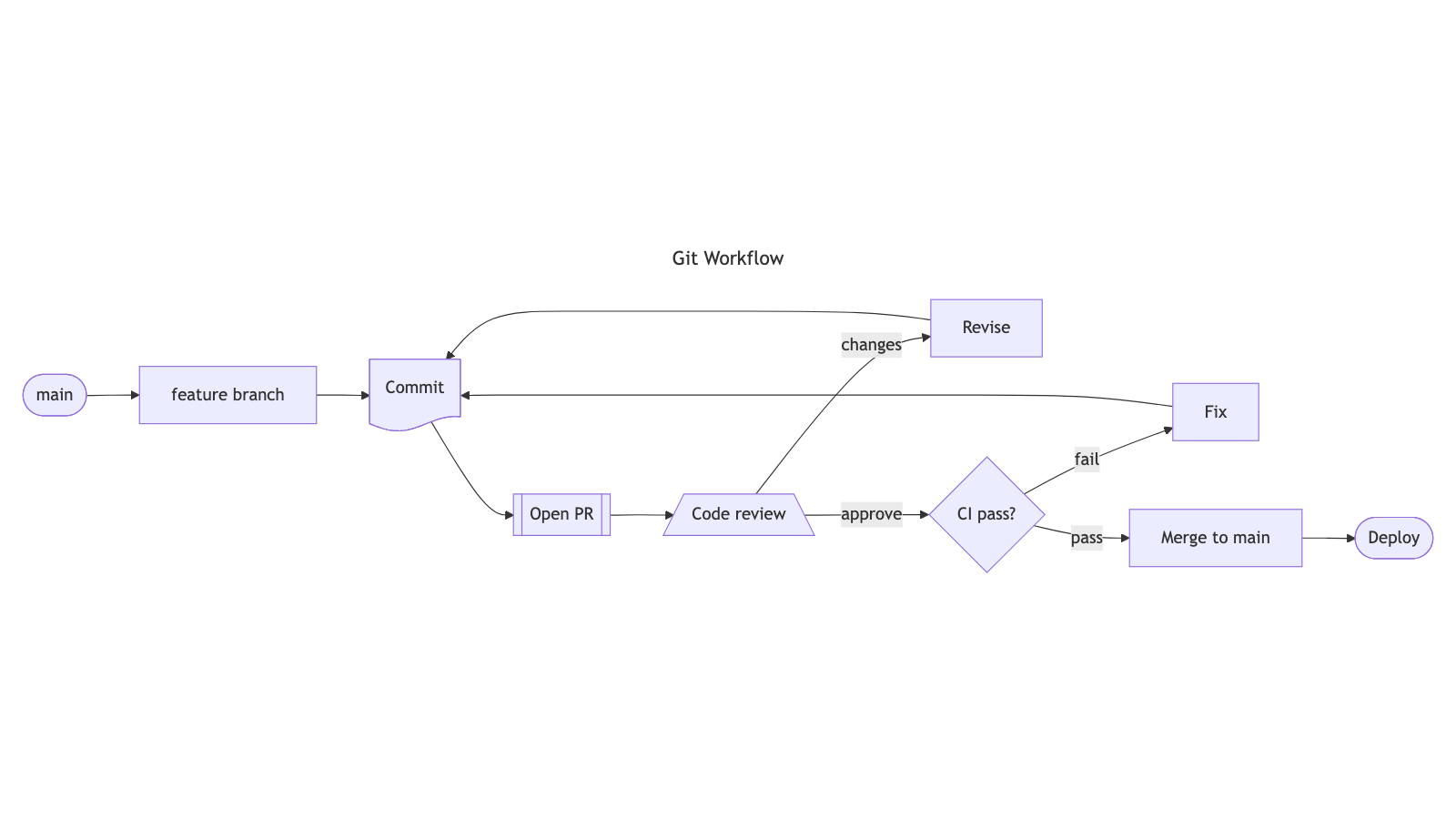
Below is a git workflow flowchart, rendered by the two different engines. The Mermaid text is the same in each case:
flowchart LR
  Main([main]) --> Feature[feature branch]
  Feature --> Commit@{ shape: doc, label: "Commit" }
  Commit --> PR[[Open PR]]
  PR --> Review[/Code review\]
  Review -->|changes| Revise[Revise]
  Revise --> Commit
  Review -->|approve| CI{CI pass?}
  CI -->|fail| Fix[Fix]
  Fix --> Commit
  CI -->|pass| Merge[Merge to main]
  Merge --> Deploy([Deploy])

  class Main,Feature ref
  class Commit,PR artifact
  class Review,Revise,Fix human
  class CI,Merge,Deploy auto
The left pane is rendered using the stock Mermaid renderer (as used at mermaid.live); the right pane is Line9. Stock Mermaid stretches the graph into a shallow band with tangled retry loops; Line9 keeps a usable aspect ratio and clearer edge routing — fewer crossings on the same source.
What each product is
mermaid.live is the widely used browser playground for Mermaid: type or paste your Mermaid language source text and you'll immediately see your diagram, rendered by Mermaid’s default renderer. It's an excellent place to learn Mermaid syntax and to check that a diagram parses. Its layout is of the standard quality delivered by Dagre or ELK-based pipelines, and which is shared by most “Mermaid websites” and embedded rendering engines.
Line9 uses the same Mermaid language but replaces the layout pipeline for flowcharts. It uses Mermaid’s own parser but then uses a completely new rendering engine to place nodes, route edges, and apply labels. The product is available in a free web viewer/editor at line9.ai/diagram and in a CLI (free for personal use) for local and agent-driven workflows. Line9 is not a new diagram language and not a fork of Mermaid syntax.
Feature comparison
| Aspect | mermaid.live | Line9 |
|---|---|---|
| What it is | Official online editor/viewer for Mermaid diagrams | New rendering engine for the same Mermaid syntax |
| Syntax | Standard Mermaid | Standard Mermaid — no new format, nothing to migrate |
| Layout engine | Dagre/ELK-based pipeline (stock Mermaid) | Line9 layout engine for flowcharts; other kinds via Mermaid |
| CLI and agent tools | Official mmdc CLI; MCP server and IDE extensions via mermaid.ai — all driving the stock renderer. | line9 CLI for local and agent workflows, running the Line9 engine. Free for personal use. |
| Sharing | URL / editor-centric sharing | URL-hash shares (universally free); durable, controlled publishing and embedding (Pro) |
| Commercial use | Follow Mermaid / mermaid.live terms | Free for personal use; Pro for commercial CLI and pro features |
Layout quality — the reason to look for an alternative
A diagram earns its place by letting you grasp in seconds what would otherwise take real work to piece together. When the layout is poor that doesn’t happen — and you rarely go back and do the work the long way. You skim it, take the gist on trust, and move on. Bad layout doesn’t cost you time; it costs you the understanding you thought you had.
The critical quality factor for flowcharts is layout. Simply restyling Mermaid (colours, fonts, CSS) can never fix scattered nodes, ambiguous label placement or elongated aspect ratios. Line9 is the engine that addresses layout quality: for flowcharts, the same Mermaid source gets a new layout, not just a new skin.
| Aspect | mermaid.live | Line9 |
|---|---|---|
| Node placement | Arranges related nodes in layers, but often stretches them into long linear chains. | Compact, regular arrangement, making better use of space and holding a usable aspect ratio. |
| Edge routing | Long meandering curves, frequent crossings, and edges that pass under nodes in dense areas. | Short orthogonal routes with consistent lane spacing and fewer crossings. |
| Typography | Label text changes node size, which distorts the layout; edge labels can land ambiguously or overlap. | Node layout is insulated from label length, and spacing is reserved for edge labels. Themes designed as typography. |
| When both look the same | — | Non-flowchart kinds already use stock Mermaid output |
Line9 gets layout right first time, so there’s no need for painstaking re-creation in a separate diagram-editor before you can use or share your flowchart.
When you do want something different, you influence rendering parameters rather than redrawing anything. Render-time settings are available to fine-tune scale and spacing, or switch the visual theme. Scale a large diagram right down and Line9 shifts to a compact form: each node is tagged with a short mnemonic code, with a legend alongside carrying the full labels, so the whole graph fits one page and stays legible. Same source, different rendering — possible because Line9 controls the renderer.
Stock Mermaid has render-time settings too: swap Dagre for ELK, or change direction. None of them fix the layout. When it comes out wrong the only recourse is a visual editor, moving boxes by hand, and at that point you have a drawing, not a diagram in text. When two nodes point at each other, stock drops one a rank below the other — how to align nodes when stock Mermaid will not is a separate page for that case.
Flowcharts get extensive upgrades with Line9. Sequence diagrams, class diagrams, state diagrams, and other valid Mermaid kinds also render in the Line9 website and tools, but only via stock Mermaid’s output. Every diagram continues to work but comparison against mermaid.live is most meaningful for flowcharts.
Export and sharing
| Aspect | mermaid.live | Line9 |
|---|---|---|
| SVG / PNG | SVG and PNG from the online editor. | SVG and PNG from the web viewer, no account needed. SVG from the CLI. |
| Watermark | N/A (stock Mermaid branding varies by host) | Small line9.ai mark on free exports; removed on Pro |
| Themes | Mermaid built-in themes | Choice of themes provided free; premium themes for Pro accounts coming soon |
| Embed / publish | Editor-centric | Hash links free; clean published share URLs on Pro |
Pricing
Line9 is free to use in the browser with no signup, and the CLI is free for personal use. Line9 Pro — $12/seat/mo early-adopter (normally $24); or $120/seat/year — adds commercial-use CLI rights, watermark removal, and published share URLs. Premium themes are coming. The early-adopter rate holds for as long as you stay subscribed, and closes to new sign-ups when the keyboard-first editor ships.
mermaid.live is free. The Mermaid team also runs a commercial product at mermaid.ai, with its own paid tiers — see their site for current details.
When to use which
Prefer mermaid.live when you are learning Mermaid syntax, debugging parse errors, or need the reference playground that matches stock Mermaid everywhere. Prefer it for non-flowchart kinds if you only need a stock layout render.
Prefer Line9 whenever a flowchart has to be read, not just created — making sense of your own code or workflow, walking a colleague through it, or putting it in a document or a slide. Keep the Mermaid your tools and agents already emit, and fix the layout.
The CLI runs on your own machine, so an AI agent working inside your project can read the real code and diagram what’s actually there. Either way there’s nothing to migrate — Line9 renders the Mermaid you already have.
Common questions
- Is Line9 a fork of Mermaid?
- No. Line9 is an independent product and is not affiliated with the Mermaid project. It reads diagrams with Mermaid’s own parser, so a Mermaid file means exactly what the Mermaid specification says it means; what Line9 supplies is a different drawing of it.
- Why does the same diagram look different in Line9 and mermaid.live?
- The two agree on what the diagram says and disagree on how to draw it. Same nodes, same edges, same labels — different positions, different edge routes, different spacing. Nothing about the meaning of a Mermaid file changes when Line9 renders it.
- Do I have to move my diagrams off mermaid.live to use Line9?
- There is nothing to move. Copy the Mermaid source out of mermaid.live and paste it into the Line9 editor, or point the Line9 CLI at a .mmd file. There is no import step and no project to set up, and the same source keeps working in mermaid.live afterwards.
- Do I need an account to use Line9?
- No. The Line9 web editor renders diagrams with no signup, the same as mermaid.live. An account is for Line9 Pro, which adds commercial use of the CLI, watermark-free exports, and publishing a diagram to a durable line9.ai URL with the audience you choose — private, your team, or public.
- Does Line9 need a browser and an internet connection?
- Not always. mermaid.live is a website, so it needs both. Line9 has a web editor that works the same way, plus a command-line tool that renders on your own machine — useful in a build, a script, or an AI agent working inside a project.
Try Line9
Paste a flowchart into the free Line9 editor — no account required. Compare engines interactively at /compare. For seats, commercial CLI rights, and Pro features, see pricing. Read more in Why Line9.