System context diagram
A system context diagram is the first and simplest level of the C4 model: one software system in the centre, the people who use it, and the external systems it depends on, with each relationship labelled with what passes along it. This one is an appointment booking system used by customers, support agents and administrators, relying on an identity provider, a payment provider, an email provider, a CRM and a calendar service. Mermaid also has a separate C4Context diagram type; this example uses ordinary flowchart syntax.
Architects and engineering leads draw this at the start of a project or a design review, because it fits on one page and makes sense to people who are not engineers. It shows what is inside the system and what is outside it, which is the first thing a security review, a vendor assessment or a new team member needs to know. Internal detail such as services and databases belongs in the next level down, the container diagram.
Mermaid source
---
title: System context diagram
---
flowchart TD
  customer([Customer]) -->|Books and pays for appointments| sys
  agent([Support agent]) -->|Moves bookings| sys
  admin([Administrator]) -->|Manages services and staff| sys
  sys[Appointment booking system]
  sys -->|Delegates sign-in| idp[Identity provider]
  sys -->|Takes deposits| pay[Payment provider]
  sys -->|Sends reminders| email[Email provider]
  sys -->|Syncs customer records| crm[CRM]
  sys -->|Blocks out staff time| cal[Calendar service]
Stock Mermaid vs Line9 on this system context diagram
Run the same source through the stock Mermaid engine and it often will not look as good. In some cases, Mermaid is able to deliver a usable graph, but not always. On this one:
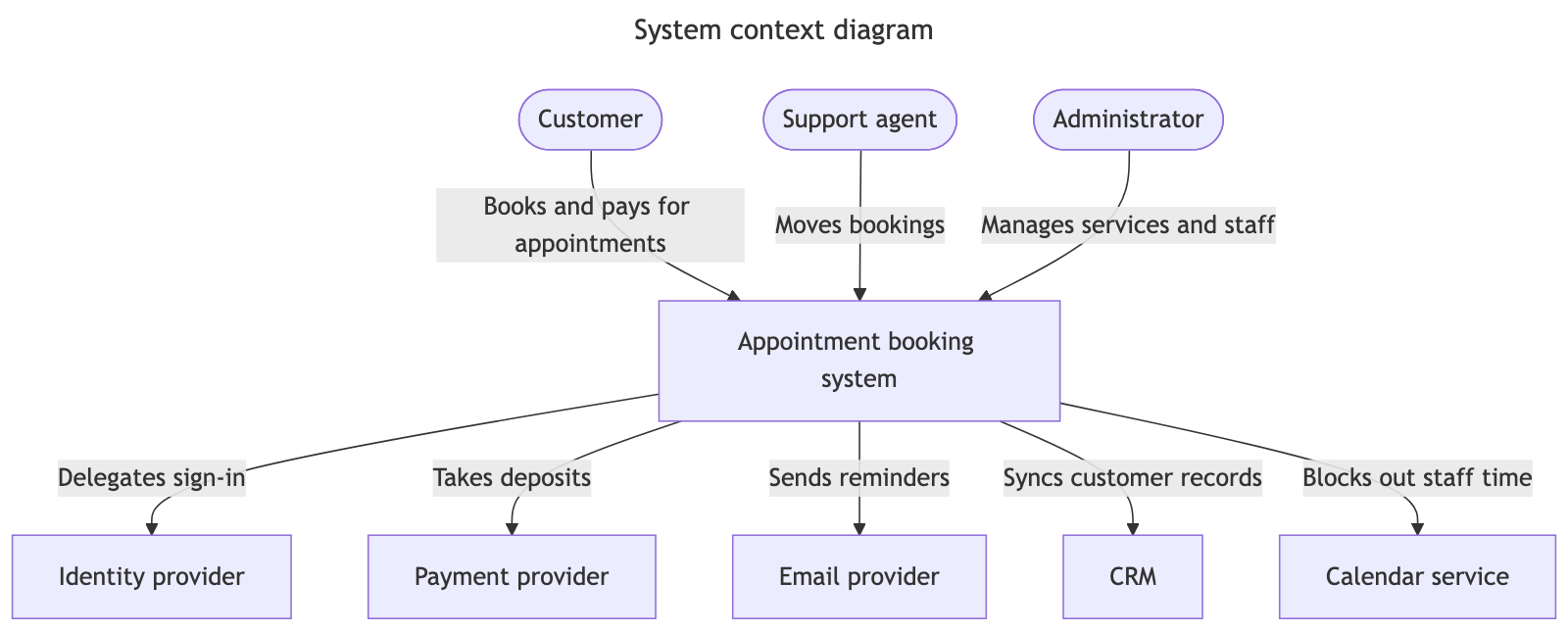
This diagram is simple enough that stock Mermaid and Line9 produce a very similar layout, with the people above the system and the external services below it. The difference is mainly in the routing: Line9 draws square-cornered edges with each label placed beside its own edge, and uses cleaner style defaults.
For a fuller product comparison — layout, export, CLI, and pricing — see Line9 vs mermaid.live.
Render your own
Paste any Mermaid flowchart into the free online editor — no account needed. Prefer the terminal? Install the line9 CLI (free for personal use).
Related diagrams
- User authentication flow (with MFA)
- GitHub pull request workflow
- CI/CD pipeline (with rollback)
- AI coding agent workflow
- Incident response runbook
- Database migration rollout
- Feature-flag canary rollout
- Webhook delivery, retry, and dead-letter flow
- Decision tree
- Payment flow
- Content approval workflow (with legal review)
- Support ticket lifecycle
- Peer-review process
- Procure-to-pay process
- Recruitment process
- Kubernetes cluster architecture
- E-commerce order processing
- RAG application architecture
- Data flow diagram
- Network topology diagram
- Event-driven architecture
- User flow diagram
- CONSORT flow diagram
- HACCP flow diagram
More scenarios on the Mermaid examples hub.