Webhook delivery, retry, and dead-letter flow
People draw this one while implementing a subscriber contract, to explain why a 400 must not tight-loop, or to show where replay actually starts. The flow splits at the response, and this is the crux: treating every failure as retryable allows a bad payload to impair both the subscriber and the remote service, and a flow without a dead-letter path has no way to resolve unexpected blockages.
Mermaid source
---
title: Webhook delivery, retry, and dead-letter flow
---
flowchart LR
  event([Domain event]) --> sign[Sign payload]
  sign --> post[POST to endpoint]
  post --> resp{Response?}
  resp -->|2xx| done([Delivered])
  resp -->|4xx client error| failed([Do not retry])
  resp -->|timeout or 5xx| attempts{Retries left?}
  attempts -->|Yes| wait[Wait with backoff]
  wait --> post
  attempts -->|No| dlq[(Dead-letter queue)]
  dlq --> ops[Operator inspects]
  ops --> replay{Replay?}
  replay -->|Yes| sign
  replay -->|No| giveup([Abandoned])
Stock Mermaid vs Line9 on this webhook delivery flow
Run the same source through the stock Mermaid engine and it often will not look as good. In some cases, Mermaid is able to deliver a usable graph, but not always. On this one:
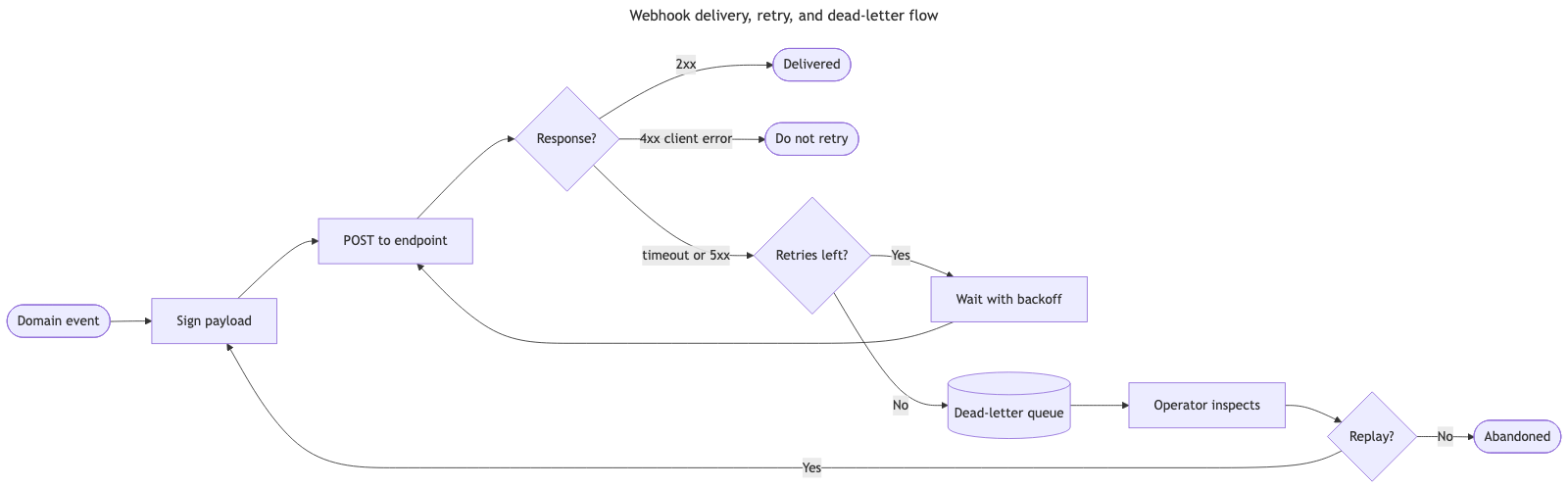
The stock Mermaid renderer positions ‘Wait with backoff’ to the right of ‘Retries left?’, rather than closer to ‘POST to endpoint’. This goes against the direction of flow, causing the diagram to appear more untidy and results in the unnecessary crossing of edges. Line9 keeps the wait-and-retry loop under the POST node so the flow is far easier to read.
For a fuller product comparison — layout, export, CLI, and pricing — see Line9 vs mermaid.live.
Render your own
Paste any Mermaid flowchart into the free online editor — no account needed. Prefer the terminal? Install the line9 CLI (free for personal use).
Related diagrams
- User authentication flow (with MFA)
- GitHub pull request workflow
- CI/CD pipeline (with rollback)
- AI coding agent workflow
- Incident response runbook
- Database migration rollout
- Feature-flag canary rollout
- Decision tree
- Payment flow
- Content approval workflow (with legal review)
- Support ticket lifecycle
- Peer-review process
- Procure-to-pay process
- Recruitment process
- Kubernetes cluster architecture
- E-commerce order processing
- RAG application architecture
- Data flow diagram
- Network topology diagram
- System context diagram
- Event-driven architecture
- User flow diagram
- CONSORT flow diagram
- HACCP flow diagram
More scenarios on the Mermaid examples hub.