E-commerce order processing
People draw this one to onboard engineers onto a retail platform, to show a security review where payment and fraud actually sit, or to explain why a missing webhook prevents an order from shipping. Grouping of nodes is important in this drawing: storefront, edge, services, data, async jobs and third parties are different trust and failure domains, and a flat mix of boxes doesn't make that visible.
Mermaid source
---
title: E-commerce order processing
---
flowchart TD
  subgraph shopper [Shopper]
    web[Web storefront]
    app[Mobile app]
  end
  subgraph edge [Edge]
    cdn[CDN]
    gw[API gateway]
    wh[Webhook handler]
  end
  subgraph svc [Services]
    auth[Auth service]
    catalog[Catalogue service]
    search[Search service]
    cart[Cart service]
    order[Orders service]
    pay[Payments service]
    fraud{Risky?}
    review[Manual review]
    inv[Inventory service]
  end
  subgraph data [Data]
    udb[(Users DB)]
    pdb[(Products DB)]
    sdb[(Search index)]
    odb[(Orders DB)]
    cache[(Session cache)]
  end
  subgraph async [Async jobs]
    q[[Order queue]]
    fulfil[Fulfilment worker]
    mailer[Email worker]
    dlq[(Dead letter queue)]
    cron[Nightly reconcile]
  end
  subgraph ext [Third parties]
    psp[Payments provider]
    courier[Courier API]
    smtp[Email provider]
  end
  web --> cdn
  app --> cdn
  cdn --> gw
  gw --> auth
  gw --> catalog
  gw --> search
  gw --> cart
  gw --> order
  auth --> udb
  catalog --> pdb
  catalog --> cache
  search --> sdb
  cart --> cache
  cart --> inv
  inv --> pdb
  order --> odb
  order --> pay
  pay --> fraud
  fraud -->|No| psp
  fraud -->|Yes| review
  review -->|cleared| psp
  psp -->|payment webhook| wh
  courier -->|tracking webhook| wh
  wh --> order
  order --> q
  q --> fulfil
  q --> mailer
  fulfil --> courier
  fulfil --> odb
  fulfil -->|failed| dlq
  dlq -->|replay| q
  mailer --> smtp
  cron -.-> psp
  cron -.-> odb
Stock Mermaid vs Line9 on this e-commerce architecture
Run the same source through the stock Mermaid engine and it often will not look as good. In some cases, Mermaid is able to deliver a usable graph, but not always. On this one:
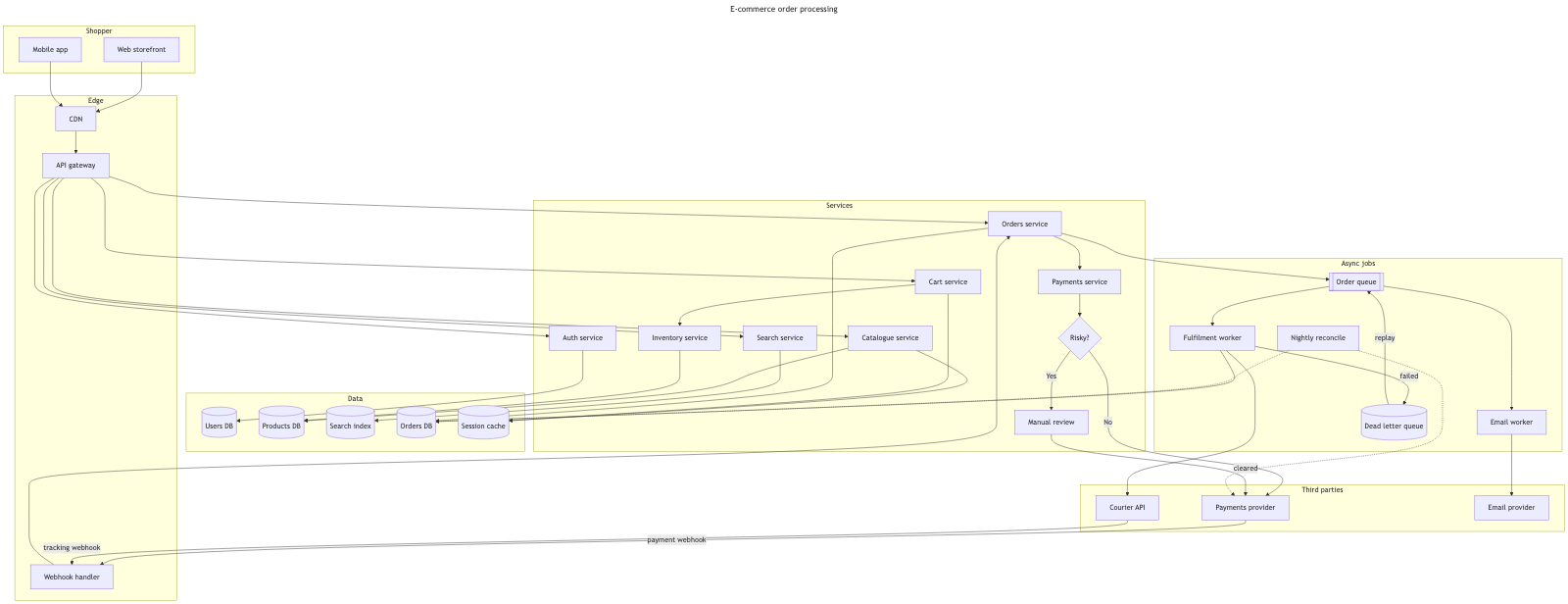
The stock Mermaid rendering looks worse than the Line9 version because the edges between the Edge group and the Services group, and between the Services and Data group are tightly packed together and so are very difficult to trace accurately. The edges also run behind nodes rather than around them which again reduces readability. These are common problems in more complex graphs when laid out using the dagre renderer.
For a fuller product comparison — layout, export, CLI, and pricing — see Line9 vs mermaid.live.
Render your own
Paste any Mermaid flowchart into the free online editor — no account needed. Prefer the terminal? Install the line9 CLI (free for personal use).
Related diagrams
- User authentication flow (with MFA)
- GitHub pull request workflow
- CI/CD pipeline (with rollback)
- AI coding agent workflow
- Incident response runbook
- Database migration rollout
- Feature-flag canary rollout
- Webhook delivery, retry, and dead-letter flow
- Decision tree
- Payment flow
- Content approval workflow (with legal review)
- Support ticket lifecycle
- Peer-review process
- Procure-to-pay process
- Recruitment process
- Kubernetes cluster architecture
- RAG application architecture
- Data flow diagram
- Network topology diagram
- System context diagram
- Event-driven architecture
- User flow diagram
- CONSORT flow diagram
- HACCP flow diagram
More scenarios on the Mermaid examples hub.