Kubernetes cluster architecture
A Kubernetes cluster architecture diagram shows the parts of a cluster and how they are wired together: a control plane holding the kube-apiserver, etcd, the scheduler and the controller manager, and worker nodes each running a kubelet, a kube-proxy and the pods themselves. It is worth being clear about what kind of drawing this is, because the two readings get confused — this is the structural one, with no decision and no loop anywhere in it, so every arrow means “talks to” rather than “and then”. The procedural reading, where an image is built, pushed and rolled out, is a different diagram entirely.
People draw this one to orient engineers who can already run kubectl but have never been shown what is answering them, to work out where a failure actually originated, or to walk a security reviewer around the trust boundaries. What the picture makes obvious, and what prose reliably buries, is that the architecture is a hub and not a chain: every component talks to the kube-apiserver and to nothing else, and the apiserver alone touches etcd. Once that shape is visible a good many questions about failure modes and access control answer themselves.
Mermaid source
---
title: Kubernetes cluster architecture
---
flowchart TD
    Kubectl([kubectl]) --> API

    subgraph ControlPlane["Control plane"]
        API[kube-apiserver]
        Etcd[(etcd)]
        Sched[kube-scheduler]
        CM[kube-controller-manager]
        API <-->|cluster state| Etcd
        Sched --> API
        CM --> API
    end

    subgraph NodeA["Worker node"]
        KubeletA[kubelet]
        ProxyA[kube-proxy]
        PodA1[Pod]
        PodA2[Pod]
        KubeletA --> PodA1
        KubeletA --> PodA2
    end

    subgraph NodeB["Worker node"]
        KubeletB[kubelet]
        ProxyB[kube-proxy]
        PodB1[Pod]
        KubeletB --> PodB1
    end

    KubeletA --> API
    ProxyA --> API
    KubeletB --> API
    ProxyB --> API
Stock Mermaid vs Line9 on this Kubernetes architecture diagram
Run the same source through the stock Mermaid engine and it often will not look as good. In some cases, Mermaid is able to deliver a usable graph, but not always. On this one:
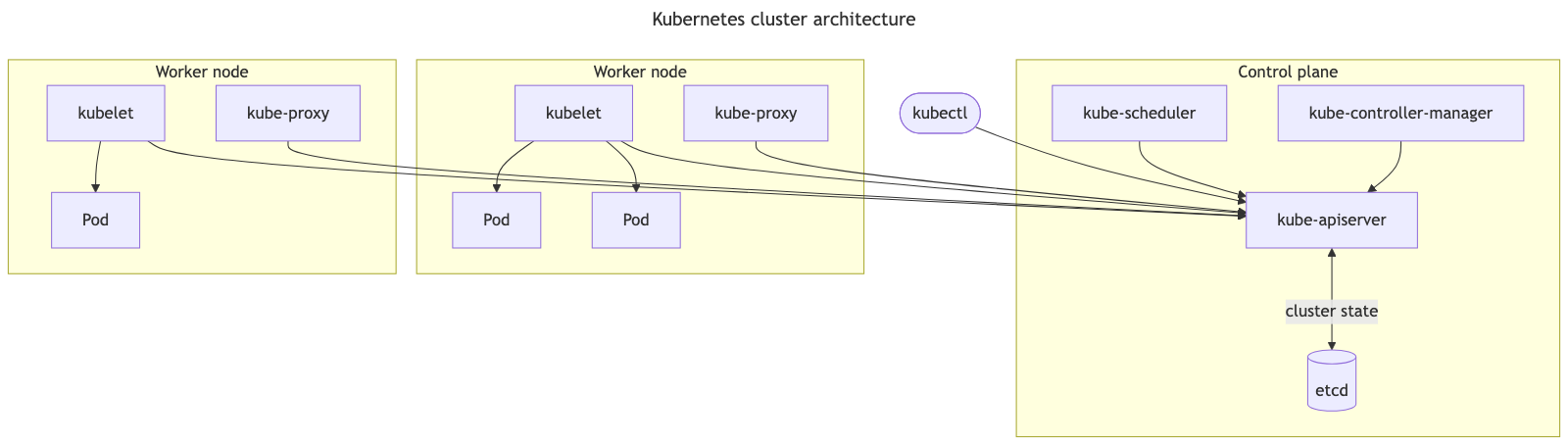
The grouped nodes in the three subgraphs ensure that the overall layout between stock Mermaid and Line9 in this architecture diagram is broadly similar. The key difference seen between them is in the routing of edges. In the Mermaid version some edges cross over the intervening subgraph very untidily and some of the eight edges that converge on ‘kube-apiserver’ become tightly packed and indistinguishable. Line9 carefully routes all edges cleanly so that all can be traced easily and unambiguously.
For a fuller product comparison — layout, export, CLI, and pricing — see Line9 vs mermaid.live.
Render your own
Paste any Mermaid flowchart into the free online editor — no account needed. Prefer the terminal? Install the line9 CLI (free for personal use).
Related diagrams
- User authentication flow (with MFA)
- GitHub pull request workflow
- CI/CD pipeline (with rollback)
- AI coding agent workflow
- Incident response runbook
- Database migration rollout
- Feature-flag canary rollout
- Webhook delivery, retry, and dead-letter flow
- Content approval workflow (with legal review)
- Support ticket lifecycle
- Peer-review process
- E-commerce order processing
- RAG application architecture
- Data flow diagram
More scenarios on the Mermaid examples hub.