Event-driven architecture
An event-driven architecture diagram shows services that communicate by publishing events rather than calling each other. Here an orders service and an accounts service each write events to an outbox table, relays publish them to topics on an event broker, and three independent consumers read them: a shipping service, a notification service and an archive loader. Each consumer keeps its own data, and the archive can replay events back into a topic after a fix.
Engineers draw this to show which services depend on which events, and to explain the patterns that stop events being lost or processed twice. The outbox pattern writes the database change and the event in the same transaction, so an event is never published for a change that did not happen, and a change is never made without its event. Brokers usually deliver at least once, so consumers such as the shipping service check the event ID and ignore duplicates, which is also what makes replaying from the archive safe.
Mermaid source
---
title: Event-driven architecture
---
flowchart LR
  subgraph producers [Producers]
    orders[Orders service]
    ordersDb[(Orders DB with outbox)]
    ordersRelay[Outbox relay]
    accounts[Accounts service]
    accountsDb[(Accounts DB with outbox)]
    accountsRelay[Outbox relay]
  end
  orders -->|row and event in one transaction| ordersDb
  ordersDb --> ordersRelay
  accounts -->|row and event in one transaction| accountsDb
  accountsDb --> accountsRelay
  subgraph broker [Event broker]
    orderTopic[[orders topic]]
    accountTopic[[accounts topic]]
  end
  ordersRelay -->|OrderPlaced| orderTopic
  accountsRelay -->|CustomerRegistered| accountTopic
  subgraph consumers [Consumers]
    shipping[Shipping service]
    seen{Event ID already processed?}
    skip[Ignore the duplicate]
    shippingDb[(Shipping DB)]
    notify[Notification service]
    notifyDb[(Notification log)]
    archiver[Archive loader]
    archive[(Event archive)]
  end
  orderTopic --> shipping
  orderTopic --> notify
  orderTopic --> archiver
  accountTopic --> notify
  accountTopic --> archiver
  shipping --> seen
  seen -->|Yes| skip
  seen -->|No| shippingDb
  notify --> notifyDb
  archiver --> archive
  archive -. replay after a fix .-> orderTopic
Stock Mermaid vs Line9 on this event-driven architecture
Run the same source through the stock Mermaid engine and it often will not look as good. In some cases, Mermaid is able to deliver a usable graph, but not always. On this one:
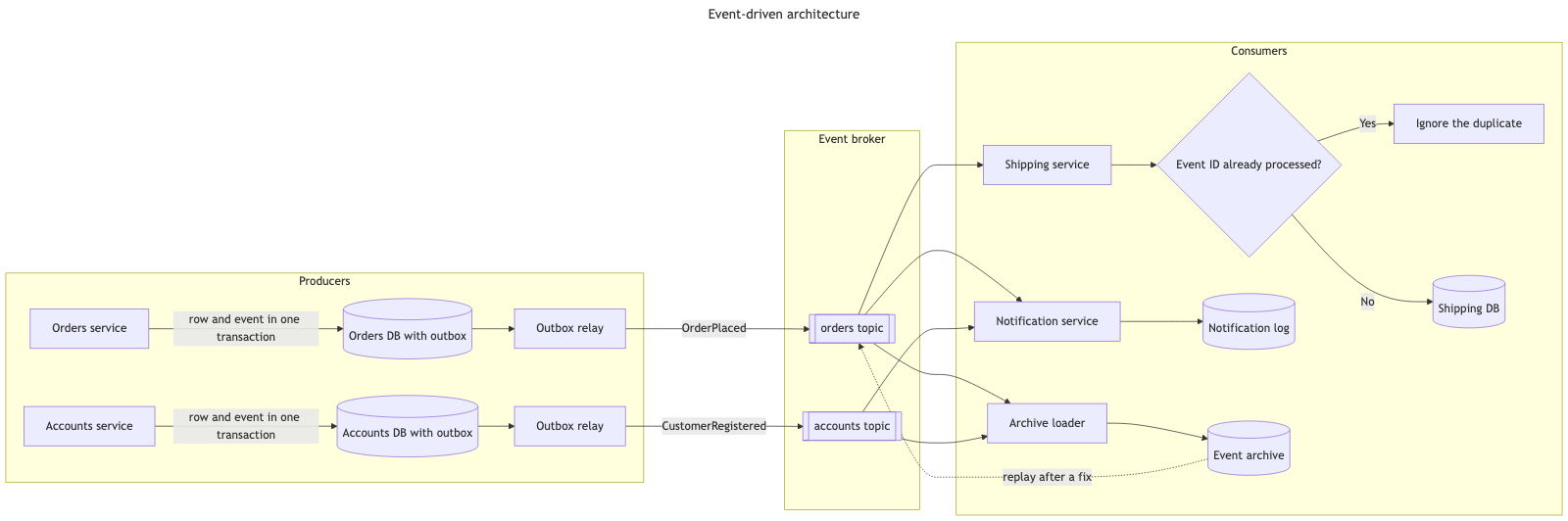
The two layouts are broadly similar here, with producers, broker and consumers as three stages from left to right. Because two of the consumers read from both topics, the edges from the topics inevitably cross on their way to the consumers, in both versions. The stock version is wider and its large decision node takes up extra room; Line9’s version is more compact.
For a fuller product comparison — layout, export, CLI, and pricing — see Line9 vs mermaid.live.
Render your own
Paste any Mermaid flowchart into the free online editor — no account needed. Prefer the terminal? Install the line9 CLI (free for personal use).
Related diagrams
- User authentication flow (with MFA)
- GitHub pull request workflow
- CI/CD pipeline (with rollback)
- AI coding agent workflow
- Incident response runbook
- Database migration rollout
- Feature-flag canary rollout
- Webhook delivery, retry, and dead-letter flow
- Decision tree
- Payment flow
- Content approval workflow (with legal review)
- Support ticket lifecycle
- Peer-review process
- Procure-to-pay process
- Recruitment process
- Kubernetes cluster architecture
- E-commerce order processing
- RAG application architecture
- Data flow diagram
- Network topology diagram
- System context diagram
- User flow diagram
- CONSORT flow diagram
- HACCP flow diagram
More scenarios on the Mermaid examples hub.