RAG application architecture
People draw this one when a retrieval system isn't delivering the required results and investigation is needed. The two halves fail differently — a bad answer can come from chunking that split a table down the middle, from a search that returned the wrong passages, or from a model that ignored good ones — and the drawing is what lets a team see those steps clearly separated. It also settles the question that comes up in every review of one of these systems: what is done once, ahead of time, and what happens on every single question.
Mermaid source
---
title: RAG application architecture
---
flowchart LR
  subgraph ingestion [Ingestion]
    docs[/Source documents/] --> extract[Extract and clean text]
    extract --> chunk[Split into chunks]
    chunk --> embedDoc[Embed chunks]
    embedDoc --> upsert[Upsert vectors]
  end
  upsert --> vdb[(Vector store)]
  upsert --> meta[(Document metadata)]
  subgraph retrieval [Query path]
    question[/User question/] --> embedQ[Embed question]
    embedQ --> search[Vector search]
    search --> rerank[Re-rank passages]
    rerank --> enough{Enough context?}
    enough -->|No| broaden[Broaden the search]
    broaden --> search
    enough -->|Yes| assemble[Assemble prompt]
    assemble --> model[Call the model]
    model --> cite[Attach citations]
    cite --> grounded{Grounded in sources?}
    grounded -->|No| abstain([No supported answer])
    grounded -->|Yes| answer([Answer to user])
  end
  search -->|nearest chunks| vdb
  cite -->|titles and links| meta
  answer --> eval[Score against the evaluation set]
  abstain --> eval
Stock Mermaid vs Line9 on this RAG architecture
Run the same source through the stock Mermaid engine and it often will not look as good. In some cases, Mermaid is able to deliver a usable graph, but not always. On this one:
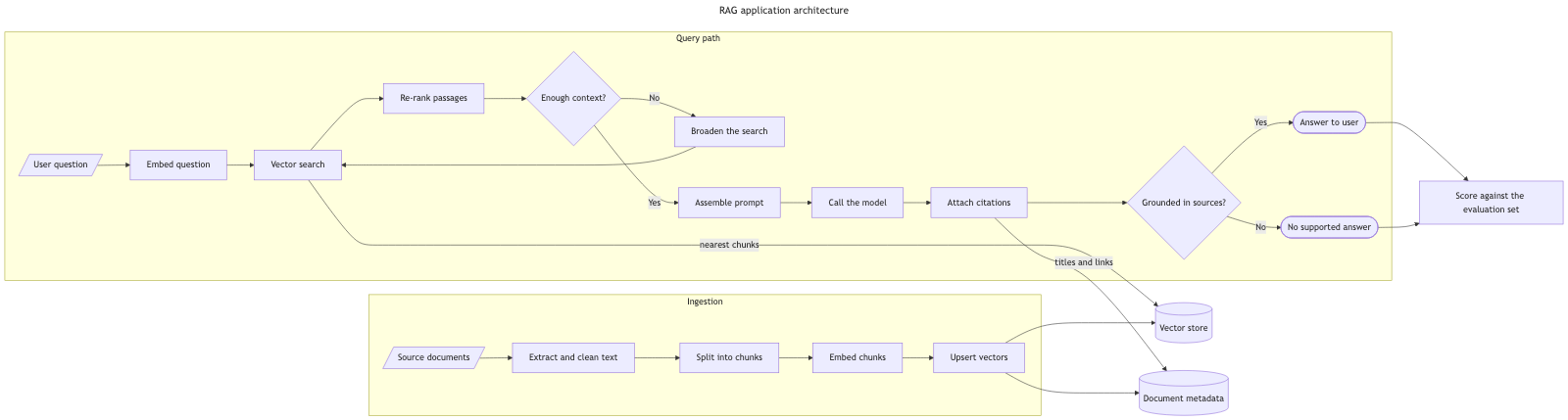
The layout from the stock Mermaid renderer is inferior to Line9 because dagre doesn't place the Vector store in the centre of the diagram. The pivotal nature of the Vector store is obscured when it's placed at one end of the diagram. This placement also causes edges to be longer than necessary and introduces crossing lines between Attach citations, Document metadata, Upsert vectors and Vector store. Dagre is also very unhelpful in placing the ‘titles and links’ edge label right where the two edges cross, creating unnecessary ambiguity. The whole graph comes back nearly four times wider than it is tall, so it has to be scaled down to fit a page and the labels shrink with it. Line9 draws the query path as one straight row, has no edge crossing and achieves a much better aspect ratio of 2.2:1.
For a fuller product comparison — layout, export, CLI, and pricing — see Line9 vs mermaid.live.
Render your own
Paste any Mermaid flowchart into the free online editor — no account needed. Prefer the terminal? Install the line9 CLI (free for personal use).
Related diagrams
- User authentication flow (with MFA)
- GitHub pull request workflow
- CI/CD pipeline (with rollback)
- AI coding agent workflow
- Incident response runbook
- Database migration rollout
- Feature-flag canary rollout
- Webhook delivery, retry, and dead-letter flow
- Decision tree
- Payment flow
- Content approval workflow (with legal review)
- Support ticket lifecycle
- Peer-review process
- Procure-to-pay process
- Recruitment process
- Kubernetes cluster architecture
- E-commerce order processing
- Data flow diagram
- Network topology diagram
- System context diagram
- Event-driven architecture
- User flow diagram
- CONSORT flow diagram
- HACCP flow diagram
More scenarios on the Mermaid examples hub.