AI coding agent workflow
People draw this one to explain what an agent is actually doing while it sits on a prompt, to review which tools are allowed to run unattended, or to show where a turn spends its time. There's sufficient complexity here to make this difficult to explain in text, so the picture really is worth a thousand words.
Mermaid source
---
title: AI coding agent workflow
---
flowchart LR
  prompt[/User prompt/] --> gather[Assemble context]
  gather --> model[Call the model]
  model --> next{Tool or answer?}
  next -->|Tool| safe{Safe to run?}
  safe -->|No| human[Ask the human]
  human --> ok{Green light?}
  ok -->|Denied| model
  ok -->|Yes| which{Which tool?}
  safe -->|Yes| which
  which -->|Read| read[[Read files]]
  which -->|Edit| edit[[Edit code]]
  which -->|Shell| shell[[Run commands]]
  read --> outcome{Did it work?}
  edit --> outcome
  shell --> outcome
  outcome -->|No| log[Capture the error]
  log --> model
  outcome -->|Yes| add[Add result to context]
  add --> room{Context full?}
  room -->|Yes| squash[Summarise the history]
  squash --> model
  room -->|No| model
  next -->|Answer| draft[Draft the answer]
  draft --> tests{Tests pass?}
  tests -->|No| model
  tests -->|Yes| reply[/Reply to the user/]
  reply --> more{Another ask?}
  more -->|Yes| gather
  more -->|No| done([Turn complete])
Stock Mermaid vs Line9 on this AI coding agent workflow
Run the same source through the stock Mermaid engine and it often will not look as good. In some cases, Mermaid is able to deliver a usable graph, but not always. On this one:
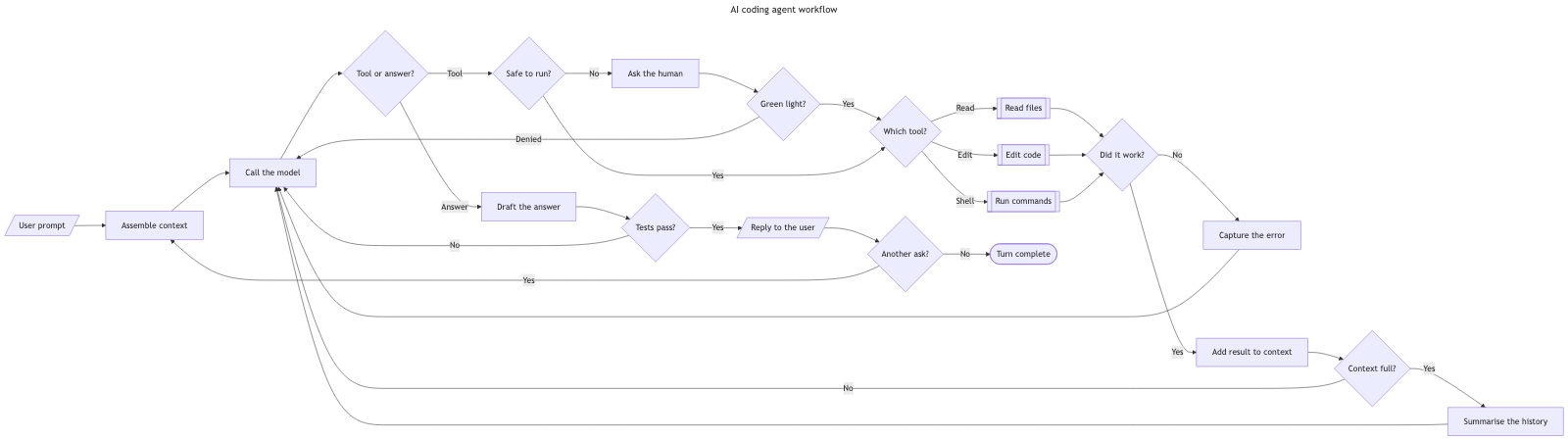
The most common fault of the stock Mermaid renderer is elongation: stretching the flowchart out into a long, narrow shape. In this example the diagram is stretched horizontally, forcing the multiple arrows that loop back to ‘Call the model’ to travel all the way from the right-hand side of the canvas. The dagre renderer's layout also produces several crossing lines which are not necessary. Line9 achieves a much more usable aspect ratio of 2.2:1, has edges that are far simpler to follow and has no edge crossings.
For a fuller product comparison — layout, export, CLI, and pricing — see Line9 vs mermaid.live.
Render your own
Paste any Mermaid flowchart into the free online editor — no account needed. Prefer the terminal? Install the line9 CLI (free for personal use).
Related diagrams
- User authentication flow (with MFA)
- GitHub pull request workflow
- CI/CD pipeline (with rollback)
- Incident response runbook
- Database migration rollout
- Feature-flag canary rollout
- Webhook delivery, retry, and dead-letter flow
- Decision tree
- Payment flow
- Content approval workflow (with legal review)
- Support ticket lifecycle
- Peer-review process
- Procure-to-pay process
- Recruitment process
- Kubernetes cluster architecture
- E-commerce order processing
- RAG application architecture
- Data flow diagram
- Network topology diagram
- System context diagram
- Event-driven architecture
- User flow diagram
- CONSORT flow diagram
- HACCP flow diagram
More scenarios on the Mermaid examples hub.