Support ticket lifecycle
People draw this one to train a new support engineer, to highlight the importance of reproducibility and to describe clearly the decision points that direct flow based on bug/query and whether the customer is satisfied with the outcome obtained. It also captures the expectation that known issues are recorded, which informs future incoming ticket triage.
Mermaid source
---
title: Support ticket lifecycle
---
flowchart LR
  raised([Ticket raised]) --> triage[Read it and set a priority]
  kb@{ shape: doc, label: "Known issues" } -. checked .-> triage
  triage --> known{Already known?}
  known -->|Yes| link[Link it to the open bug]
  link --> watching([Watching])
  known -->|No| repro[Try to reproduce it]
  repro --> got{Can you repro?}
  got -->|No| ask[Ask for steps and a version]
  ask --> repro
  got -->|Yes| kind{Bug or query?}
  kind -->|Query| answer[Answer it, then write it up]
  answer -. adds to .-> kb
  kind -->|Bug| fix[Fix it and ship]
  fix --> happy{Customer happy?}
  happy -->|No| repro
  happy -->|Yes| closed([Ticket closed])
  closed -->|reopened| triage
Stock Mermaid vs Line9 on this support ticket lifecycle
Run the same source through the stock Mermaid engine and it often will not look as good. In some cases, Mermaid is able to deliver a usable graph, but not always. On this one:
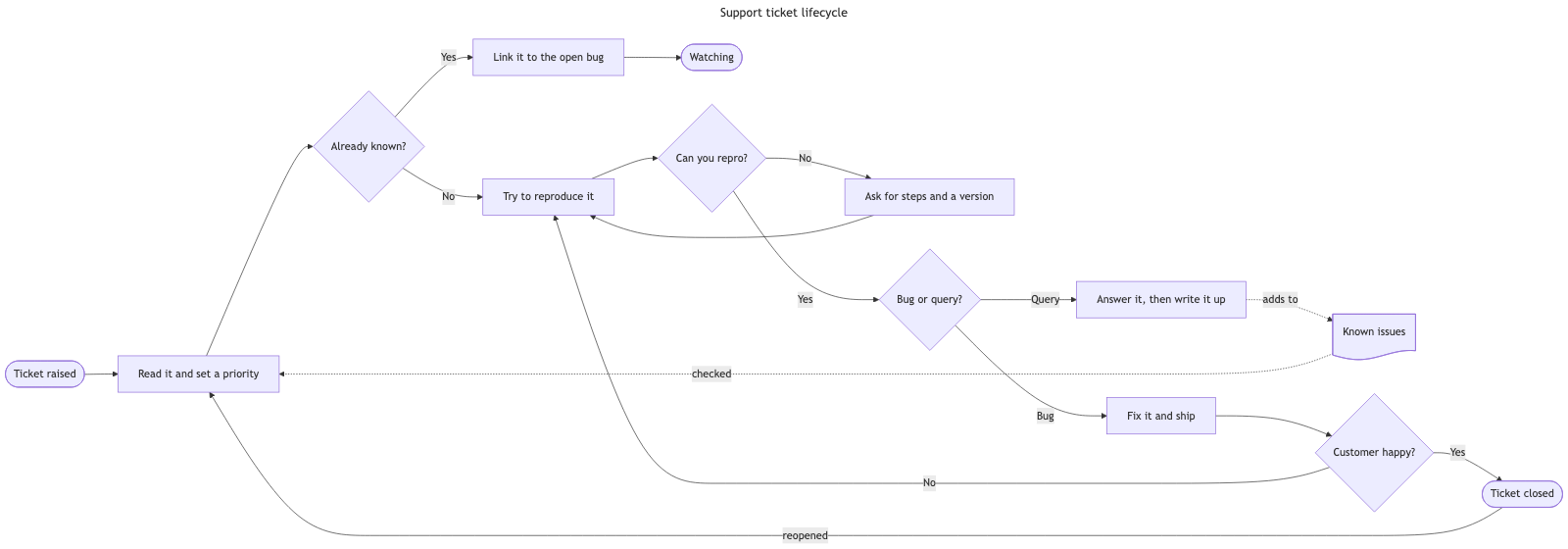
In this diagram the aspect ratios between renders from stock Mermaid (dagre) and Line9 are similar. The advantage with the Line9 render lies with the closer positioning of related nodes. The node positions from stock Mermaid are particularly bad here because they cause lines between nodes to cross over unnecessarily. Line9's layout entirely avoids this problem.
For a fuller product comparison — layout, export, CLI, and pricing — see Line9 vs mermaid.live.
Render your own
Paste any Mermaid flowchart into the free online editor — no account needed. Prefer the terminal? Install the line9 CLI (free for personal use).
Related diagrams
- User authentication flow (with MFA)
- GitHub pull request workflow
- CI/CD pipeline (with rollback)
- AI coding agent workflow
- Incident response runbook
- Database migration rollout
- Feature-flag canary rollout
- Webhook delivery, retry, and dead-letter flow
- Decision tree
- Payment flow
- Content approval workflow (with legal review)
- Peer-review process
- Procure-to-pay process
- Recruitment process
- Kubernetes cluster architecture
- E-commerce order processing
- RAG application architecture
- Data flow diagram
- Network topology diagram
- System context diagram
- Event-driven architecture
- User flow diagram
- CONSORT flow diagram
- HACCP flow diagram
More scenarios on the Mermaid examples hub.