Line9 is live: a new rendering engine for Mermaid
· 8 min read
Paste a Mermaid flowchart – get a diagram you’d show to your team.
We Mermaid users are familiar with disappointment.
We see designer diagrams in conference slides and dashboards, all harmonious colours and tidy presentation that beg us to study them and absorb the story they’re telling. And then we see the output from Mermaid — and it’s not wrong as such, it’s just devoid of care and organisation, and sometimes barely scrapes over that line that separates diagram from scribble.
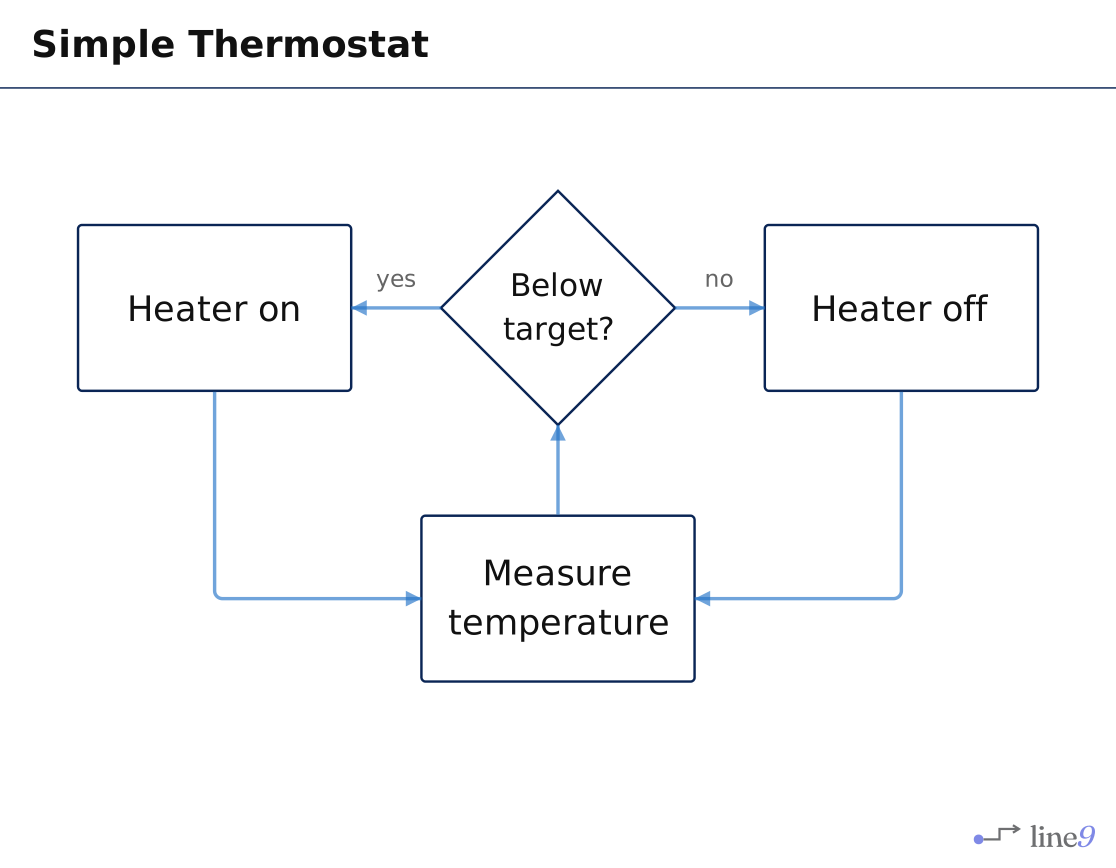
A thermostat: measure the temperature, turn the heater on or off, measure again. Four boxes and five arrows — about as small as a flowchart gets.
Look at where Mermaid puts the arrow label no: right where two lines cross. You can't tell which arrow it belongs to.
Line9 sets the four boxes on a grid, runs the arrows without crossing, and labels each arrow precisely.

Mermaid has so much promise. The versionable text, the concision, the portability, the AI affinity — it seems so right and these attributes work very effectively for Markdown. Then we look at what Mermaid delivers. Arrows swing out in long curves when they could have gone directly. Nothing lines up with anything, every shape a different size. Diagrams stretch out in long strings, and when you zoom out far enough to see all of it you find that the labels are too small to read.
So we start looking for a diagram ‘editor’ that lets us import Mermaid and then drag things around by hand. After twenty minutes of clicking we’d be forgiven for doubting Mermaid’s value at all.
Line9 is live today. A rendering engine for Mermaid, built from scratch, with its own layout engine underneath. Same source, different result.
The problem isn’t colours
It’s tempting to assume this is a styling problem — that a coloured theme or rounded corners would fix it. It won’t, because the problem is layout: where the boxes go and how exactly the lines join them up.
How do you change layout?
Not easily. Most Mermaid renderers build on one of two layout libraries, Dagre or ELK. Both solve the genuinely hard problem of arranging any graph correctly, which is impressive. They’re also tuneable to a degree, but unfortunately don’t have a dial to turn up the readability because layout is determined, and constrained, by the algorithms they use.
What Line9 does instead
Line9 entirely replaces those two common layout libraries with an engine written with one clear purpose: making diagrams communicate well.
(It’s no accident that the default theme name is ‘Boardroom’ — the aspiration is to generate diagrams you’d be comfortable presenting to the board.)
Lots of considerations have gone into making flowcharts communicate better. The main improvements are nodes having regular sizes and grid positioning, rather than being strewn untidily; edges running orthogonally and routing around obstacles instead of cutting across the picture; related shapes staying closer together so lines are shorter; and the whole diagram being proportioned to fit a page or screen rather than sprawling.
The result isn’t “the same diagram with a nicer theme.”* It’s the same diagram, arranged the way you’d have arranged it yourself if you had twenty minutes and a mouse. And the revelation? Mermaid is worth using after all.
* — although Line9 does of course have very nice themes.Three diagrams, two ways
Here are three diagrams, defined in Mermaid source text and rendered once by stock Mermaid and once by Line9. There’s no sleight of hand going on, we’re simply feeding the same Mermaid text to each engine.
What I hope — what I think you’ll see, is that you can use Mermaid for real, after all.
1 · Calling a helpline — proportion
A simple flowchart with nine nodes, strung out in a line. It comes out five times wider than it's tall — Mermaid puts the diagram on a rack.
aspect ratio 5.4 : 1

The same nine nodes, using the same width but arranged to natural page proportions. Both of these renders are legible but only Line9 lays them out in a shape suitable for showing on a slide.
aspect ratio 1.6 : 1
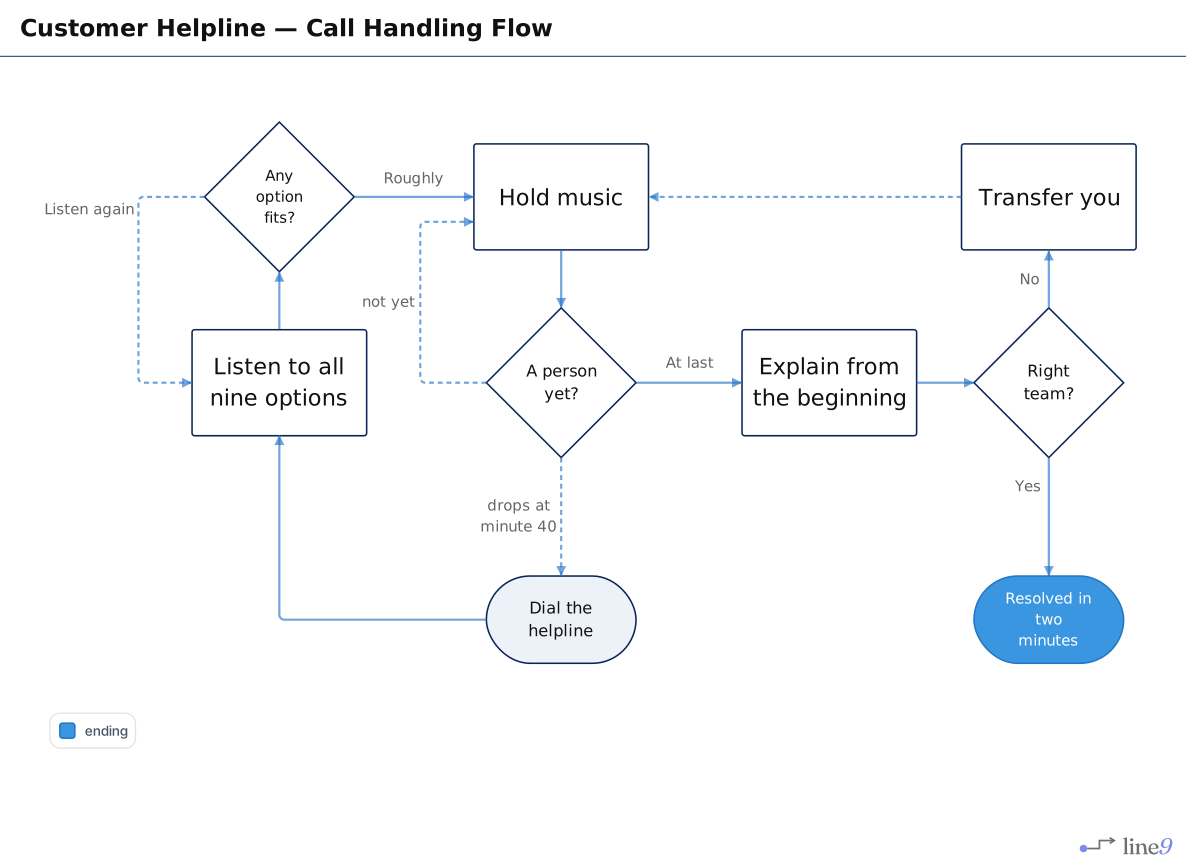
The lesson, obvious as it may sound, is that diagrams have to fit on a page or a screen before anyone will read them. These links show you the same real-world (larger) flowchart, in which you’d have no option but to bin the Mermaid and reach for the diagram editor.
- Scan classifier flowchart - rendered at mermaid.live
- Scan classifier flowchart – rendered at line9.ai
2 · Single Sign On — grid layout and regular sizing
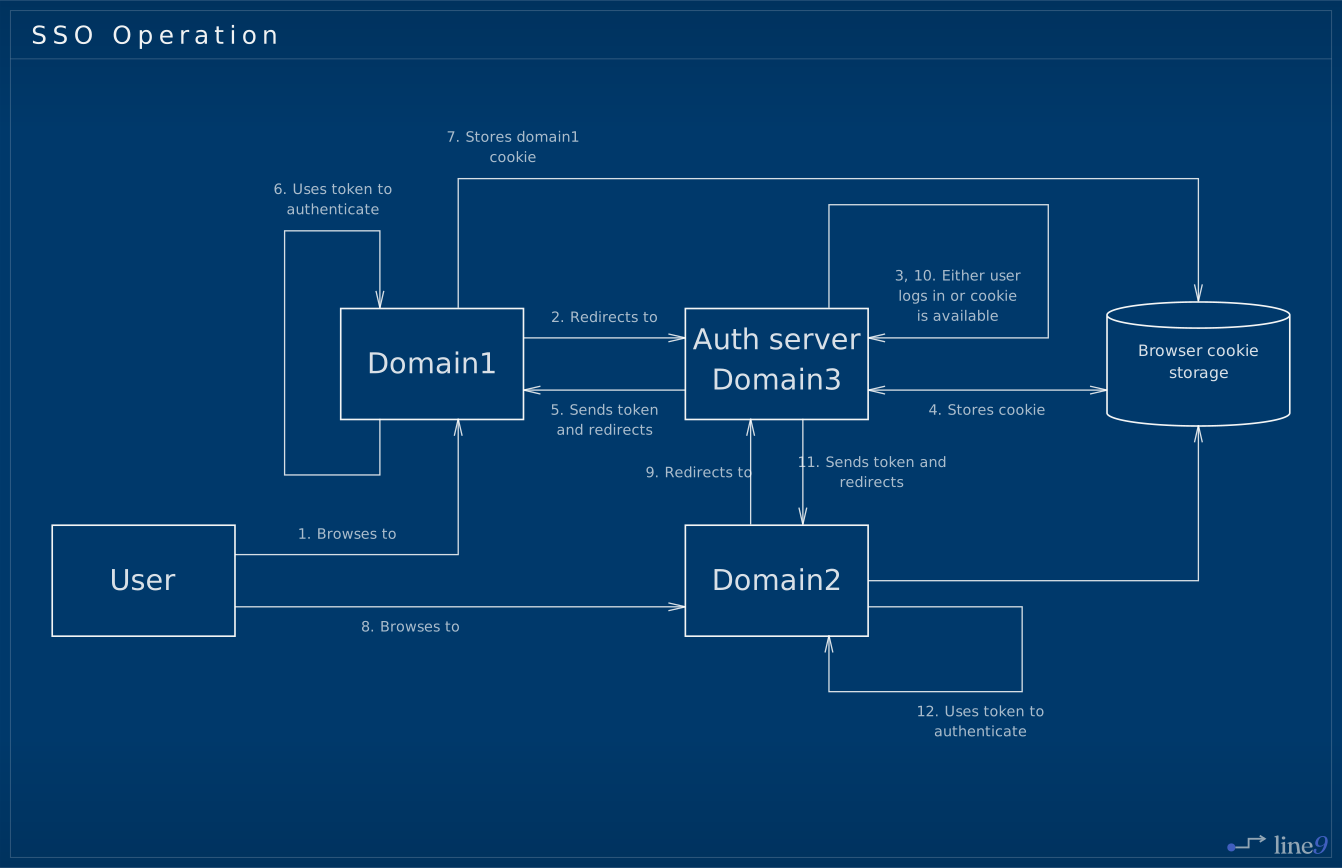
This flowchart only has five nodes, but is full of arrows. The nodes are spread out and irregularly sized, which isn't merely untidy — it forces the arrow paths to be very long and tricky to follow.
aspect ratio 4.2 : 1

Here, the nodes are on a grid and their sizes are kept consistent. This is not just aesthetic: it reveals the relationships between nodes and lets the connecting lines stay short and direct.
Look at both renders to see the position of the 12. Uses token to authenticate arrow label. Since Line9 makes the arrows short and direct, it can then place the label precisely and clearly.
You can see how the benefits of improved layout compound:
good node positions → shorter, tidier arrows → legible label placement.
aspect ratio 1.6 : 1
3 · Inside a coding agent — routing
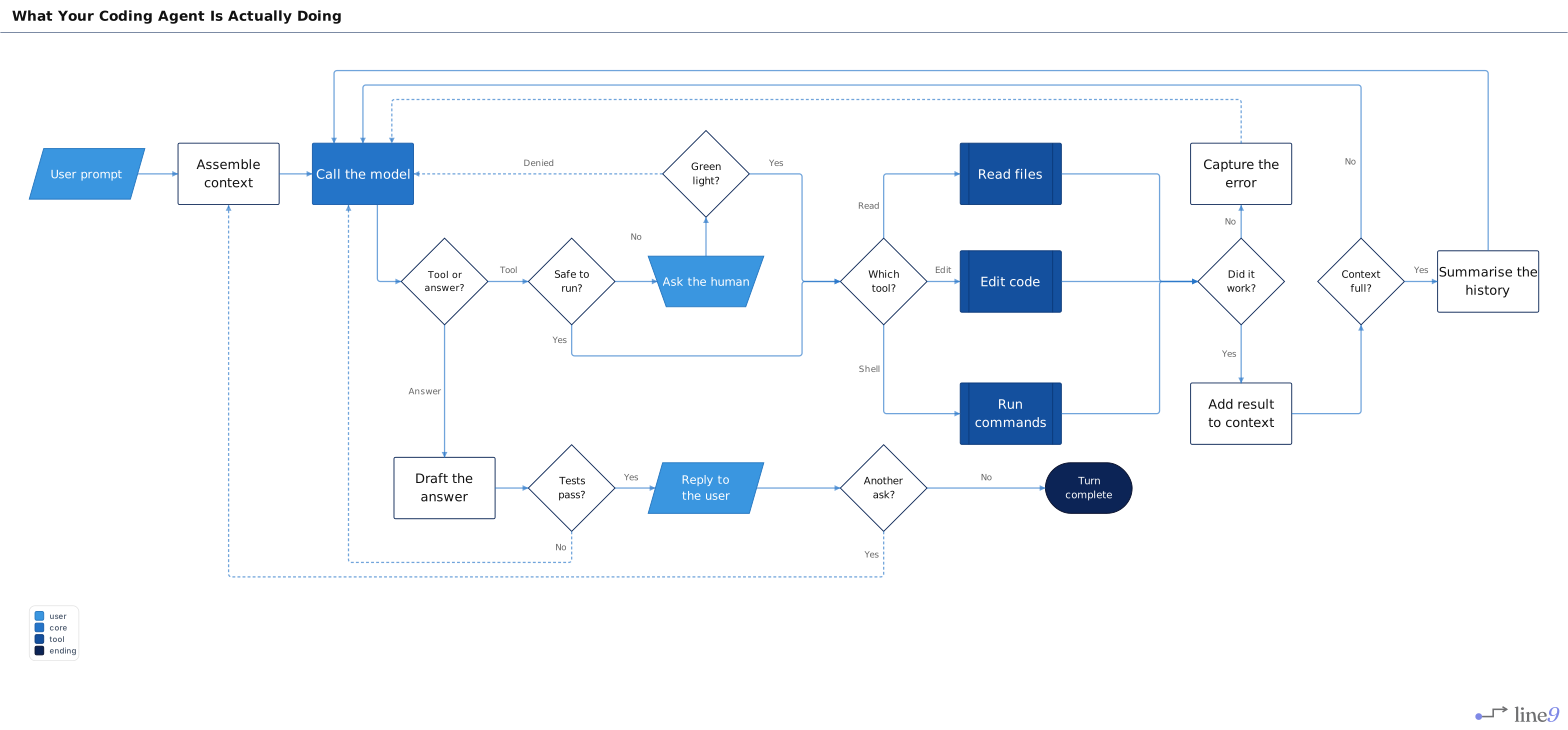
This one's somewhat recursive, given that it was created by Claude. It has twenty-one nodes, eight decisions, and five paths looping back to 'Call the model'.
Stock Mermaid draws long curves that sweep underneath the whole diagram and converge tightly at the destination.
aspect ratio 3.3 : 1

Line9 runs the return arrows in neat, easy to follow lanes and avoids lines crossing over each other unnecessarily. You can read the Mermaid version, but you'd rather read this one.
aspect ratio 2.4 : 1
Try for yourself now. Paste your own flowchart into the free viewer — no account necessary.
Diagramming in the AI era
Mermaid was a good enough idea that it caught on and spread widely. A lot of diagrams were created, with the serendipitous result that LLMs are naturally fluent in Mermaid.
It’s not a coincidence that LLMs like Mermaid, because Mermaid is just text and LLMs delight in delivering reams of text. It doesn’t matter how many diagrams you want, your agent will keep spitting them out all afternoon. All you need, then, for a genuinely useful AI explainer is:
the AI must have access to the information that you want made into a diagram.
It’s no good asking a cloud-SaaS tool to diagram your architecture, because your architecture details are private.
the AI must produce diagrams that are good enough for reading and sharing.
Diagrams have to be clear and usable instantly; having to edit them by hand is a non-starter if you want rapid understanding and value. Disposable diagrams are now a thing.
Line9 provides a neat CLI tool that your locally-running agent can use with as much context as you want to give it. The agent simply writes the Mermaid source and then calls
line9 render architecture.mmdand you then see the diagram immediately. The CLI is free for personal use. line9 bootstrap adds skills to Claude Code, Codex, etc. so your agent knows it exists.
Credit to Mermaid
Mermaid is not ours. It’s an excellent open-source project and it won for good reasons: text is version-controllable, it can be written into any document, and an AI can write it fluently. It’s built into GitHub, Obsidian and VS Code, and it’s the format you’ll most often get by default.
Line9 doesn’t replace it or compete with it. Mermaid has already solved describing a diagram: Line9 is all about drawing it.
(Line9 is an independent project and is not affiliated with the Mermaid project or Mermaid Chart.)
What it costs
Free — the web viewer at line9.ai, and the CLI for personal use. Full rendering quality, nothing held back on the render itself. Output carries a line9 watermark, and you can’t publish to a permanent Line9 URL.
Pro — $24 per seat/month. Commercial use of the CLI, no watermark, published diagrams with permanent links, a workspace for your team.
What Line9 is not
It’s not a new diagram language. Other tools solved diagram quality by giving you an editor. They are real solutions and good for the right people, but if you’re editing then it’s no longer Mermaid. Line9 keeps the canonical language unchanged and fixes the renderer instead.
It’s not open source. The renderer only runs at Line9 — not on npm, not embeddable, not something you can lift out. Why? Layout quality is subjective and is built on an opinionated vision. I’d like it to remain coherently my vision for the present time. Nonetheless, free use is generously functional and private.
Your diagrams are always yours. Mermaid source is plain text and it never leaves your browser (unless you share or publish through Line9). Capture it, take it elsewhere, render it with another tool, walk away whenever you like. Other renderers are available — though I do hope you prefer this one on its merits.
What’s still rough
As of today:
- Flowcharts are where the engine is strong. Other diagram types render, but they don’t yet get the same treatment.
- Large graphs are slower to arrange than I’d like.
- Subgraphs still need some work in relative positioning and orientating.
- Edge label positioning is good but not always perfect.
- Some unnecessary line crossings still exist.
If you have a diagram that Line9 handles badly, I genuinely want to understand why. Send in feedback (button in the /diagram page) and I’ll know where more work is needed.
What’s next
Keyboard-first editing is coming: a Vim-like way to build and restructure a diagram without ever reaching for a mouse. Alongside it: an MCP server, so an AI can use Line9 without going through the shell; more diagram types getting Line9 treatment rather than the fallback; more themes; and steady work on the rough edges mentioned above.
Try it
Paste a Mermaid flowchart into the free viewer — no account, nothing to install, about thirty seconds to find out whether you like it.
If you do, install the CLI and let your agent use it too.
— James